
How do I build or read a raw Modbus message?
Updated 10 November 2026
Short answer
A Modbus message is a short run of bytes: who it is for, what to do, which register, how many, and a checksum. The free frame builder and decoder builds a request for you with the checksum filled in, and takes bytes you paste from a serial monitor or Wireshark and explains each one.
Use it when a device won't answer and you want to see exactly what is on the wire, or to check a request by hand before you send it. In the pictures, each numbered coloured circle matches a numbered step.
Build a request
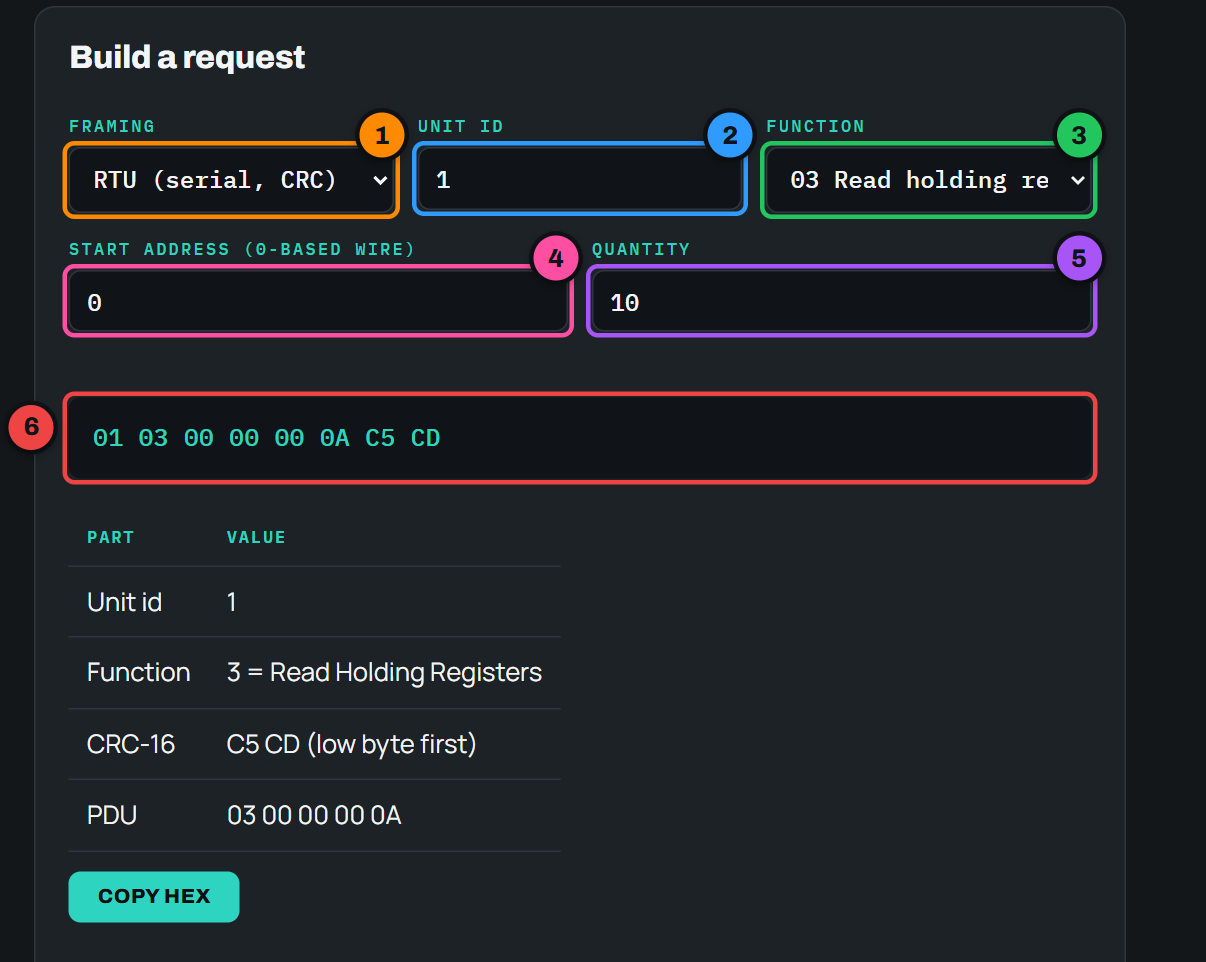
- 1 (orange circle) Framing. RTU is serial (RS-485) with a CRC. TCP is Ethernet with a 7-byte header. ASCII is the rare readable serial form with a colon and an LRC.
- 2 (blue circle) Unit id. Which device the message is for.
- 3 (green circle) Function. What to do: 03 reads holding registers, 04 reads input registers, 01 and 02 read coils and discrete inputs, 05, 06, 15 and 16 write.
- 4 (pink circle) Start address. The 0-based wire address. If your manual says 40001, the wire address is 0; the address converter does the sum.
- 5 (purple circle) Quantity. How many registers (up to 125) or coils (up to 2000).
- 6 (red circle) The bytes. Copy these into your tool.
The example gives 01 03 00 00 00 0A C5 CD:
| Bytes | Meaning |
|---|---|
01 | Unit id 1 |
03 | Function 3, read holding registers |
00 00 | Start address 0 |
00 0A | Quantity 10 |
C5 CD | CRC-16, sent low byte first |
Decode bytes you captured
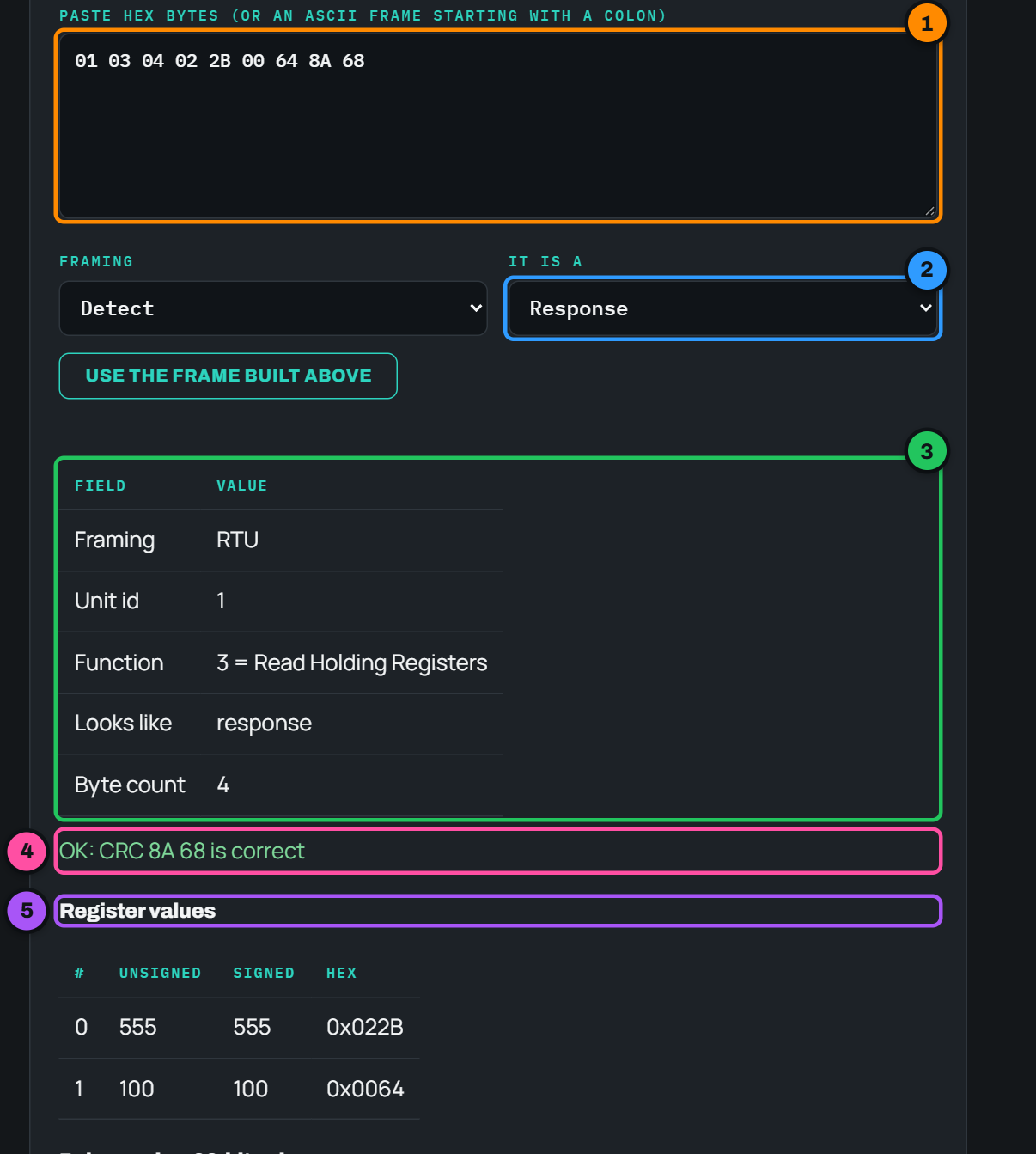
- 1 (orange circle) Paste the bytes. Spaces, commas,
0xprefixes and line breaks are all fine. Only hex digits are accepted, so stray text is rejected rather than guessed at. - 2 (blue circle) If you know whether it is a request or a response, say so. The tool tells you when it can't be sure.
- 3 (green circle) The table explains the frame: framing type, unit, function and the fields that follow.
- 4 (pink circle) The checksum result. OK means the bytes arrived intact. PROBLEM shows the CRC it expected, which is the quickest way to spot a noisy line or a wrong baud rate.
- 5 (purple circle) For a read reply, the register values are shown as unsigned, signed and hex, with 32-bit readings of each pair underneath.
In the example, 01 03 04 02 2B 00 64 8A 68 is a reply carrying 4 bytes of data: register values
0x022B (555) and 0x0064 (100).
Reading the result
- An exception reply has the function code plus 0x80 and a one-byte code. The decoder spells it out; see what the exception codes mean.
- A wrong CRC usually means electrical noise, the wrong baud rate or parity, or bytes lost in your capture. See Modbus CRC errors.
- Some frames fit two readings. A frame can sometimes be read as RTU or as TCP. When the RTU checksum is correct, the tool shows RTU and says the other reading exists; use the Framing list to switch.
- Only functions 1 to 6, 15 and 16 are explained. Other valid functions are shown as raw bytes.