
My Modbus value is wrong: how do I find the word order and scale?
Updated 10 November 2026
Short answer
A 32-bit number takes two Modbus registers, and manufacturers store the two halves in different orders. Many devices also store a value multiplied by 10 or 100. Read it the wrong way and you get nonsense. If you know roughly what the value should be, for example the number on the device's display, the free word-order and scale finder tries every reading and shows the ones that match.
In the pictures, each numbered coloured circle matches a numbered step.
Steps
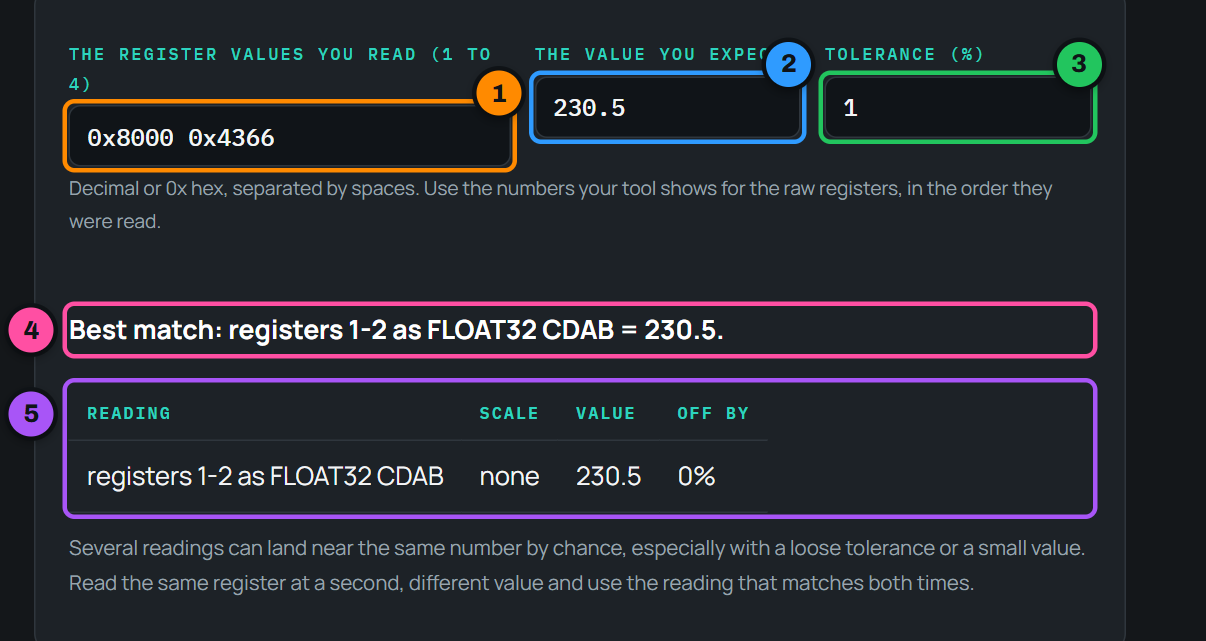
- 1 (orange circle) Enter the raw register values exactly as your tool shows them (one to four, decimal or
0xhex, in the order they were read). Here the two registers are0x8000and0x4366. - 2 (blue circle) Enter the value you expect, such as the voltage on the meter's display. Here, 230.5.
- 3 (green circle) Tolerance is how close counts as a match, in percent. 1 is a good start.
- 4 (pink circle) The best match. Here the pair is a FLOAT32 with the words swapped (CDAB) and no scale:
0x4366 0x8000is 230.5 as a standard float. - 5 (purple circle) Every reading that came within tolerance, with its scale and how far off it is.
What the answer means
| Result says | Meaning | Where to use it |
|---|---|---|
| FLOAT32 ABCD | The high register comes first | Home Assistant: no swap line needed |
| FLOAT32 CDAB | The low register comes first (very common) | Home Assistant: swap: word |
| BADC | Bytes swapped inside each register | Home Assistant: swap: byte |
| DCBA | Everything reversed | Home Assistant: swap: word_byte |
| Scale x 0.1 | The device stores tenths | Multiply the raw number by 0.1 (scale: 0.1) |
Be careful with
- Chance matches. Several readings can land near the same number, especially when the value is small or the tolerance is loose. Read the same register at a second, different value and keep the reading that matches both times.
- The registers must belong together. If a value spans two registers, enter both, in the order read. A neighbouring register that is something else will give a false answer.
- It is a way to check a guess, not a replacement for the manual. The register-map guide says where to find one.